




Managing my Social Security Benefits and Services through an e-ID account
Question: What is an e-ID account?
Answer: When a Maltese resident is issued with an Identity card from the Maltese government agency Identità, they are automatically assigned with an e-ID account, giving them access to all government online services which request e-ID authentication. The Identity Card Unit is the authority responsible for issuing e-ID accounts for an individual residing in Malta.
Question: How do I register for an e-ID account?
Answer: Since you are automatically issued with an e-ID account when you are served with the Maltese identity card, all you need to do is contact the Maltese government agency Identità at [email protected] or by phone at (+356) 25904300 in order to have your email address and mobile number verified with your Identity Card number. Once you go through this process, you can log in to any online government service after being authenticated.
Question: How do I log in with my e-ID account to submit a Social Security benefit application or access a service online?
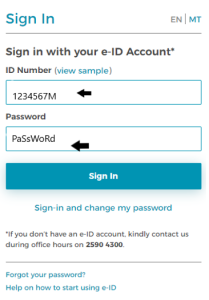
Answer: To log in with your e-ID to submit a Social Security benefit application or access a service online, you must key in your Identity Card Number and password as indicated below. As a further step to security, there was the introduction of the two-factor authentication (2FA) after keying in your Identity card number and the password. This is depicted in the image further below. This procedure would require you to key in a 6-digit code, which is either sent to your respective mobile or to your email address. You will then automatically be redirected to the application or service of your choice. You will automatically be redirected to the application or service of your choice. It is of utmost importance that your e-ID password is never shared with other persons, as it holds the key to all your details and requests throughout all government departments and entities. It is adviceable to always log out once you have completed your online submissions.
Question: What should I do if I forget my e-ID password and need to log in?
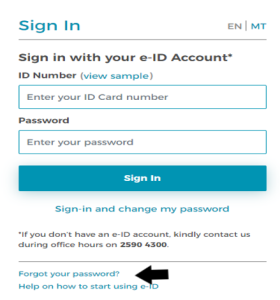
Answer: If you have forgotten your e-ID password, click ‘Forgot Password’, as indicated by the arrow below. You will be prompted to enter a new password, and an email will be sent to your email address or mobile number to confirm your identity.
Question: What should I do if I discover that my personal information is incorrect after logging in with my e-ID to submit an application?
Answer: If upon logging in with your e-ID account you notice that the information showing on screen is not correct, there are two things that you need to identify.
- If it is the Name, Surname or Address that are incorrect, then you need to contact the Maltese government agency Identità on [email protected] or call (+356) 25904300. This may mean that your details on your physical Identity Card may also be incorrect.
- If the incorrect information is about your email address or contact number then you can and must update this information by logging in to the site https://eid.gov.mt with your e-ID credentials and change the details from under the Contact Settings section. This is an instant change with the information provided. From this link you can also change your own e-ID password.
Question: Why should I use my e-ID for submitting an application or access a service?
Answer: There are various benefits when using your e-ID account to submit an application or to access a service online. Such advantages include faster, more convenient, and immediate access to services without the hassle of physically attending while waiting and queuing in line at a servizz.gov hub. Aside from that, it is a safe way to submit an application or access personal information.
Question: What will I gain by accessing online services using my e-ID account?
Answer: If you are accessing online services by authenticating with your e-ID account, you will be provided with realtime information regarding personal details as held by the Department of Social Security. Changes to your other personal information held by the Department of Social Security can be made using these online services, which can be accessed via mySocialSecurity app for updating your contact and banking details. Also, through the Application Monitoring service, you can also view the status of your application requests.
Question: If I am a European Union (EU) Citizen and prefer not to apply for the Maltese identity card and hence I cannot use the authentication process, how can I still apply for a benefit or make use of a service provided by the Department of Social Security?
Answer: Since through the Freedom of Movement act you have the right not to apply for a Maltese identity card, in order to make use of the online services or apply to applications online, then you would need to attend personally at one of the servizz.gov hubs so that they can apply on your behalf.
Question: I am unable to use my e-ID account on the Social Security Department portal, although it works correctly on other government department portals.
Answer: If that happens, simply follow the steps below to log successfully with your e‑ID to use our online services.
- Sign in to the e-ID Portal and verify your identity through two-factor authentication.
- Select the “Manage Access” option.
- Open the “Data Access” drop-down menu.
- Locate “Social Security Service Provider at MITA” and click “Withdraw Access”.
- Once the access has been withdrawn, sign out of the portal and try accessing the online service again.
If you continue to encounter an error during the authentication process, please contact us through our Contact Us page and let us know which online service is affected. We will review your case and provide the guidance required to help resolve the issue.